

Apple Pencil Pro

6 in stock
incase of installments will the official price
- Can sense when you squeeze it and bring up a new palette
- A custom haptic engine provides precise feedback that you can feel
- A new gyroscope allows you to rotate the Apple Pencil for precise control
- Preview exactly where your Apple Pencil will touch down on your display
- Quickly switch between tools, like a pen and eraser, with a double tap on Apple Pencil
- Features make marking up, taking notes, and creating a masterpiece more intuitive than ever
7,999 EGP 8,999 EGP
6 in stock
Apple Pencil Pro
Overview

Squeeze
can sense when you squeeze it and brings up a new palette, so you can quickly switch tools, line weights, and colors.
Barrel roll
A new gyroscope allows you to rotate for precise control of shaped pen and brush tools.

Haptic feedback
A custom haptic engine provides precise feedback that you can feel. When you squeeze or double‑tap, you’ll feel a light pulse confirming the action.
Apple Pencil hover
Preview exactly where your Apple Pencil will touch down on your display and see a virtual shadow of your tool. So you can write, sketch, and illustrate with even greater precision.
Double tap
Quickly switch between tools, like a pen and eraser, with a double tap on Apple Pencil Use Apple Pencil hover to preview exactly where will touch down on the display and double tap to quickly switch tools

Dream it up. Jot it down.
sets the standard for how drawing, note‑taking, and marking up documents should feel — intuitive, precise, and magical. With pixel‑perfect precision, low latency, tilt sensitivity, and support for palm rejection, Apple Pencil is incredibly easy to use and ready when inspiration strikes.
Charges Magnetically
And if you misplace Apple Pencil Pro while you’re out and about or at home, you can easily locate it in the Find My app. attaches, pairs, and charges magnetically on the side of your iPad.
Features:
- Can sense when you squeeze it and brings up a new palette
- A custom haptic engine provides precise feedback that you can feel
- A new gyroscope allows you to rotate for precise control
- Preview exactly where your Apple Pencil will touch down on your display
- Quickly switch between tools, like a pen and eraser, with a double tap on Apple Pencil
- Features make marking up, taking notes, and creating a masterpiece more intuitive than ever
| Size and Weight | Length: 166 mm (6.53 inches)
Diameter: 8.9 mm (0.35 inches) Weight: 19.15 grams (0.68 ounces) |
| Connections | Bluetooth |
| Other Features | Magnetically attaches, pairs and charges |
| System Requirements | iPadOS 17.5 or later |
| Compatibility | iPad Models iPad Pro 13-inch (M4) iPad Pro 11-inch (M4) iPad Air 13-inch (M2) iPad Air 11-inch (M2) |
Based on 0 reviews
Only logged in customers who have purchased this product may leave a review.
Compatible products
-
Covers and Cases, KeyBoards
Nillkin Bumper Combo Keyboard Case iPad Pro 13 (M4/M5) (2024/2025) (Backlit Version)
-30%Quick View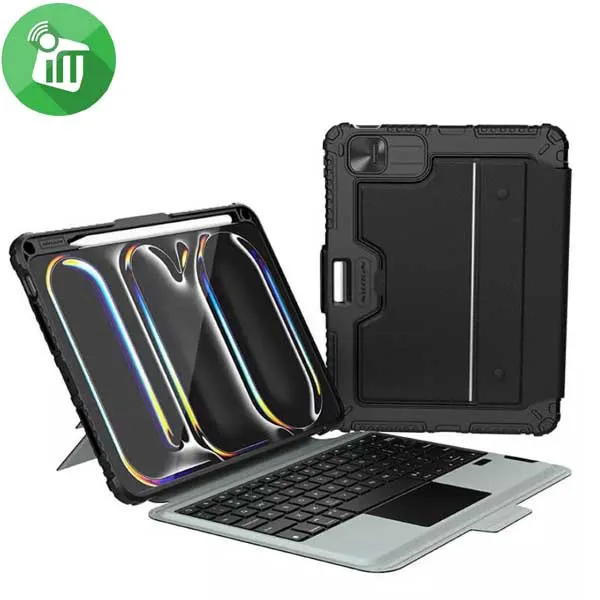 Covers and Cases, KeyBoards
Nillkin Bumper Combo Keyboard Case iPad Pro 13 (M4/M5) (2024/2025) (Backlit Version)
incase of installments will the official price
- Reliable protection
- Convenient for your work and entertainment
- Built-in magnet connection supports Tablets’ auto-wake/sleep feature
- Made with imported TPU, PC, and PU material, Bumper gives your Tablet triple protection
- Mold by integral injection with geometric design subtly combines with protection and fashion.
- The flip cover is made of selected PU leather with no texture, which is durable and anti-slip.
SKU: 6902048298637 -
Covers and Cases, KeyBoards
Nillkin Bumper Combo Keyboard Case iPad Pro 11 (M4/M5) (2024/2025) (Backlit Version)
-30%Quick ViewCovers and Cases, KeyBoardsNillkin Bumper Combo Keyboard Case iPad Pro 11 (M4/M5) (2024/2025) (Backlit Version)
incase of installments will the official price
- Reliable protection
- Convenient for your work and entertainment
- Built-in magnet connection supports Tablets’ auto-wake/sleep feature
- Made with imported TPU, PC, and PU material, Bumper gives your Tablet triple protection
- Mold by integral injection with geometric design subtly combines with protection and fashion.
- The flip cover is made of selected PU leather with no texture, which is durable and anti-slip.
SKU: 6902048298620 -
Covers and Cases
Silicone Sleeve Grips Case all Apple Pencil / all Huawei M-Pencil
incase of installments will the official price
- The material is not easy to deform, and does not affect charging and use
- The non-slip concave pen body design is ergonomic and writes smoothly
- It can protect the stylus from normal scratches, dirt, tearing and wear
- Softness enhances the grip of the pen, avoiding pain and fatigue caused by long-term use
- Suitable for Apple Pencil 1, Pencil 2, Pencil Pro, Pencil USB-C, Suitable for Huawei M-Pencil 1, M-Pencil 2, M-Pencil 3
SKU: n/a -
Covers and Cases
Adhesive Attached Silicone Holder Pencil Case
incase of installments will the official price
- Easy to install and remove
- Simple Soft Silicone Design
- Made of high-quality silicone, soft and flexible
- Protects the surface from scratches, dust, and fingerprints
- The case is equipped with a metal carabiner
- Anti-drop and anti-fingerprint, soft hand touch feeling
- Charging hole available, no need to remove the case when charging
- Protects your charging box against dust, bumps, drops, and scratches without adding any bulk
SKU: n/a -
Covers and Cases
JCPal Flexa Folio Case With Pencil Holder iPad 10.2 (2019-2021)
incase of installments will the official price
- Intelligent sleep/wake functionality
- Ultra thin and lightweight design
- Cover folds to hold iPad at 30° or 60°
- Featuring a luxurious suede cover that supports multiple viewing angles
- ultra slim and lightweight Casense Folio Case provides elegant protection
- rovides complete protection without restricting access to the iPads buttons or camera
SKU: n/a -
Screen Protectors
X.One iPad Pro 13 (2024)/Air 13 (2024) Magnetic Paper like Screen
incase of installments will the official price
- paper-like texture writing and painting with a stylus
- Matte surface treatment reduces the adhesion of fingerprints
- Reduces glare
- protection against scratches
- High-precision input
- Easy to install and remove at any time
SKU: 60107633 -
Screen Protectors
X.One iPad Pro 11 (2024)/iPad Air 11 (2024) Magnetic Paper like Screen
-23%Quick View Screen Protectors
X.One iPad Pro 11 (2024)/iPad Air 11 (2024) Magnetic Paper like Screen
incase of installments will the official price
- paper-like texture writing and painting with a stylus
- Matte surface treatment reduces the adhesion of fingerprints
- Reduces glare
- protection against scratches
- High-precision input
- Easy to install and remove at any time
SKU: 60107626 -


There are no reviews yet.