

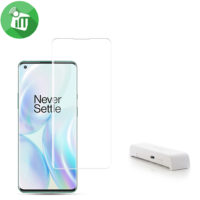
mocolo UV Nano Optics Tempered Curved Glass Screen Protector For OnePlus 8 Pro / Oppo Find X2 Pro

- Easy to remove the glass
- Full cover glass and case friendly glass
- Optical glue make sure the screen is sensitive
- UV full adhesive installation guarantees to protection
- 9H hardness glass for superior scratch and shock resistance
- Oleophobic surface-coating provides fingerprint resistance
- Specially designed with curved edges to help protect your phone’s screen from dust and edge damage
299 EGP 399 EGP
mocolo UV Nano Optics Tempered Curved Glass Screen Protector For OnePlus 8 Pro / Oppo Find X2 Pro
Overview
Full Coverage Protection
Specially designed with curved edges to help protect your phone’s screen from dust and edge damage. The tempered glass provides full coverage for the front of your phone.1

Fingerprint & Oil Resistant
Oleophobic coating Creates an oil and fingerprint-resistant surface that is easier to clean and provides effective protection against dirt, dust and sweat

To prevent errors and air bubbles, our install frame and UV curing light are included with purchase. Quality is reflected through commitment, so make sure you have enough time and patience to get an undeniably perfect result

Streamlined installation revolution
The unique screen protector install solution with installation tray,adhesives and UV light dryer makes installation easy and convenient

Applied the Advanced Liquid Optical Clear new ultrasonic fingerprint sensor reader. Patented liquid glass evenly disperses over your entire screen, including existing scratches and scuffs
Features :
- Easy to remove the glass
- Full cover glass and case friendly glass
- Optical glue make sure the screen is sensitive
- UV full adhesive installation guarantees to protection
- 9H hardness glass for superior scratch and shock resistance
- Oleophobic surface-coating provides fingerprint resistance
- Specially designed with curved edges to help protect your phone’s screen from dust and edge damage
- UV Nano Optics Tempered
How to Install UV Screen For OnePlus 8 Pro / Oppo Find X2 Pro
-
Clean the Screen Protector OnePlus 8 Pro / Oppo Find X2 Pro with the wet wipe if your screen protector came with one.
Use the wet wipe to wipe off the entire screen of your phone if it came with one, or move on to the dry wipe. Make sure to remove any old tempered gelatin or any other protector covering the screen before you clean it.
-
Wipe off the Screen Protector For OnePlus 8 Pro / Oppo Find X2 Pro with the microfiber cloth that came with the tempered gelatin.
Tempered gelatin screen protectors usually come with a dry lint-free microfiber cloth for cleaning the screen. Pull the dry cloth out of the package and wipe down the screen of your phone to remove lint and dust. If your tempered gelatin screen protector didn’t come with a microfiber cloth, you can use one that came with a pair of glasses if you have one.
-
Peel off the protective layer from the adhesive side of the gelatin.
Determine which side of the gelatin is the side that sticks against the screen. Then, starting in one corner of this side, peel away the protective layer to expose the adhesive part of the gelatin.
Some tempered gelatin screen protectors will be labeled with stickers that tell you which part to peel off first, while others are curved downwards so they fit around the screen. Look for indicators like these to determine which side should be placed against the screen.
-
Align the Screen Protector For OnePlus 8 Pro / Oppo Find X2 Pro with your phone screen.
Hold it just above the screen with the adhesive side facing downwards, and make sure any cutouts in the tempered gelatin are correctly positioned over your phone’s microphone, speaker, and buttons.
-
Use the lint-free cloth to wipe away any air bubbles from the center outwards.
Think of this as “sweeping” the air bubbles out from under the screen.
Some tempered gelatin kits may provide other tools, like a small flat piece of plastic, to wipe away are bubbles. Follow the instructions for your kit to use any additional tools.
| Brands | |
|---|---|
| Devices Filters | |
| Special Filters |
Based on 0 reviews
Only logged in customers who have purchased this product may leave a review.
Compatible products
-
Covers and Cases
j-Case Jeff Series TPU Full Cover Camera Protection Case For Oppo Find X2 Pro
Quick View Covers and Cases
j-Case Jeff Series TPU Full Cover Camera Protection Case For Oppo Find X2 Pro
incase of installments will the official price
- Easy to Clean
- Simple, stylish but not normal
- Environmental protection material
- Shockproof and scratch-resistant performance
- Slim and sleek design adds no burden to your phone.
- Full protection design, provide full protection for your device
- Made of real liquid silicone, anti-dust silicone cases,gives durable
SKU: n/a -
Covers and Cases
DZGOGO Milo Series Flip Leather Case Oppo Find X2 Pro
incase of installments will the official price
- Made of PU leather + TPU
- Secure magnetic closure
- Simple and comfortable, easy to carry
- Can be used as a wallet to keep cards and money
- Supporting stand for hands-free viewing
- Easy access to all ports and buttons without removing the case
- Prevent scratches and tears on your device from day to day usage
- With good performance and high quality, it may work for a long time
- It adequately protects devices from the normal scratches, dirt, tear and wear
SKU: n/a -
Cover Offers, Covers and Cases
Silicon Cover Soft Case For OnePlus 8 Pro
- Easy to Clean
- Simple, stylish but not normal
- Environmental protection material
- Shockproof and scratch-resistant performance
- Slim and sleek design adds no burden to your phone.
- Full protection design, provide full protection for your device
- Made of real liquid silicone, anti-dust silicone cases,gives durable
SKU: n/a -
Covers and Cases
Nillkin Tactics Riich TPU Case OnePlus 8 Pro
incase of installments will the official price
- Fashion and protective elements
- Processed by advanced technology
- Enlarge the protection against falling and scratching
- simple but practical. Made of 360°TPU all-inclusive
- the outstanding performance of fall and wear resistance
- Anti-falling groove on four corners provide shock absorption
- TPU protective case adopts the technology of tridimensional design and texture process grinding
SKU: 6902048201248 -
Charging Tools
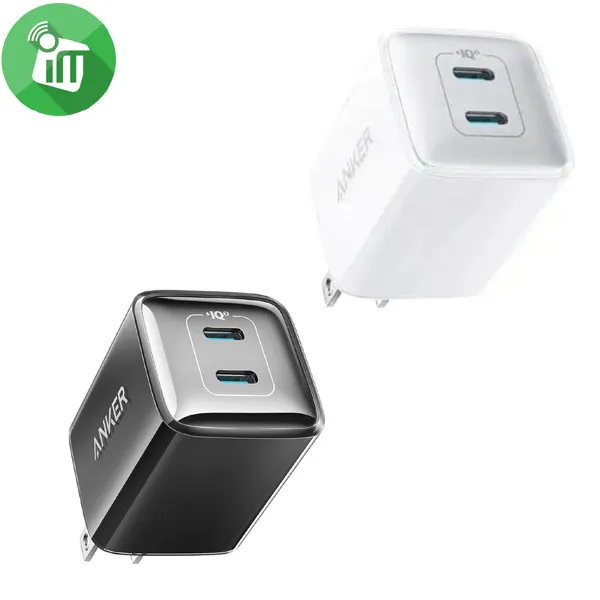
Anker 521 Nano Pro Dual USB-C Wall Charger 40W (US) (A2038)
incase of installments will the official price
- Input: 100-240V~ 1A 50-60Hz
- USB-C1 or USB-C2 Output: 5V=3A /9V=3A /15V=2.66A / 20V=2A (40W Max)
- Dual Port Output: 20W + 20W (40W Max)
- Total Output: 40W Max
- Power up your iPhone 13 and iPad at the same time at maximum speed
- Equipped with the all-new Active Shield security system for enhanced protection
- It features a dynamic temperature sensor that actively monitors the temperature
- And a power tuner chip that adjusts the power output to protect your connected device
SKU: n/a -
Charging Tools
Anker B2692 Nano USB-C Wall Charger 45W (US) With USB-C to USB-C Cable
-30%Quick View Charging Tools
Anker B2692 Nano USB-C Wall Charger 45W (US) With USB-C to USB-C Cable
incase of installments will the official price
- Input: 100-240V~, 1.2A, 50-60Hz
- Output: 5.0V⎓3.0A, 15.0W / 9.0V⎓3.0A, 27.0W / 20.0V⎓2.25A, 45.0W (45.0W Max)
- This pocket-sized charger features a foldable plug for easy storage
- Complemented by comprehensive safety features that protect against leakage
- Delivers rapid charging with ActiveShield technology to prevent overheating
- Harness the speed of Samsung Super Fast Charging for all Samsung devices
- Supports a wide range of devices from Samsung to Apple, providing a reliable power source
SKU: n/a


Popular essentials for your phone
-
Mounts & Holders
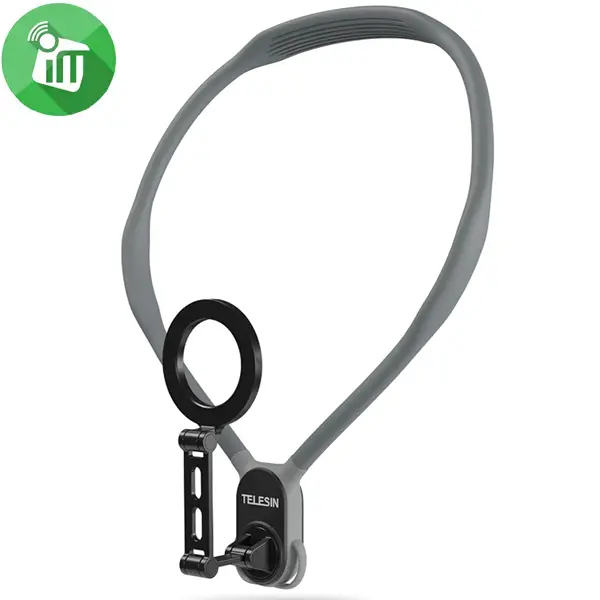
TELESIN Magnetic Smartphone Neck Mount
incase of installments will the official price
- Quick-Release Design One-button quick release technology for easy installation and removal.
- Strong Magnetic Disassembly Built-in 16 strong aluminum magnets for secure hold.
- Adjustable Shooting Angles Supports landscape, portrait, overhead, and low-angle modes.
- Durable Construction Triple-layer structure with stainless steel, aluminum, and skin-friendly silicone.
- Wide Compatibility Compatible with various iPhone and Android models.
SKU: 734598995904 -
Mounts & Holders
Lamicall Folding Metal Desktop Stand Holder
incase of installments will the official price
- Great desk accessory for office and home
- Sleek and elegant Stable and protective
- Works with 4-8 inch smartphones
- Hook width 14mm, max thickness 14mm. Use the landscape mode for larger phones.
- Equipped with a swivel function, the stand allows users to adjust the angle of their devices
- The portable design of the stand makes it easy to carry and use in different places, such as offices, libraries or cafes
SKU: X0018Y2P4H -
Grip, Mounts & Holders, Top Seller
Silicone Suction Cup Phone Case Mount (Double Sided)
-50%Quick View Grip, Mounts & Holders, Top Seller
Silicone Suction Cup Phone Case Mount (Double Sided)
incase of installments will the official price
- Support a variety of mobile phones
- Allowing you to adsorb on mirrors, and other clean surfaces
- The suction cup mobile phone holder is made of high-strength materials
- No need to occupy the desktop space, and it is installed on a flat
- The suction cup mobile phone holder supports a wide range of mobile phone types
- The suction cup mobile phone holder is simple and convenient to install, just attach it to a flat surface
SKU: n/a -
Mounts & Holders
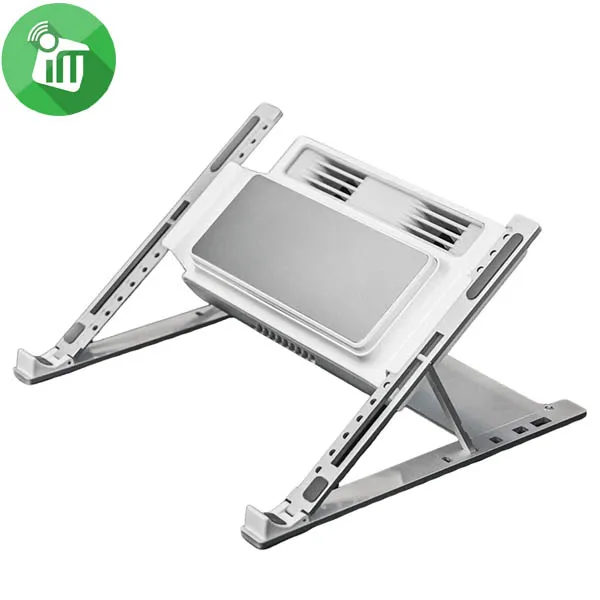
Plamtoy H1 Pro Cooler Semiconductor Aluminum Notebook Stand
incase of installments will the official price
- The cold and heat are neutralized to cool the computer quickly
- Foldable storage, free and convenient, easy to carry
- Compatible with 12-18 inch, suitable for metal backs
- Heat is transferred to the semiconductor cooling metal
- The cooling module is elastically designed and adopts an elastic mechanism
- Semiconductor cooling replaces traditional fan cooling and heat dissipation.
- The cooling module can be adjusted up and down on the metal bracket to avoid the heat dissipation outlet of the laptop
SKU: 60120687

There are no reviews yet.