

Logitech Crayon Digital Pencil For iPad

Out of stock
incase of installments will the official price
24 months warranty
- mark up work documents and PDFs for quicker feedback
- take hand-written notes for more flexibility and context than typing
- Enjoy unparalleled accuracy and control with a pixel-precise digital pencil
- A smart tip dynamically adjusts line weight depending on the angle you place it down — just like a regular pencil.
- Crayon empowers them to write, create, and learn at home or in the classroom – and yes, that includes lefties!
3,399 EGP 4,200 EGP
Logitech Crayon Digital Pencil For iPad
Overview
Logitech Crayon is a versatile, pixel-precise digital pencil for all iPads (2018 and later) that boosts productivity and lets you get creative. Mark up PDFs, take handwritten notes, or sketch diagrams.1


GRAB A CRAYON
Logitech Crayon is a versatile, pixel-precise digital pencil for all iPads (2018 and later) that boosts productivity and lets you get creative. You can also mark up PDFs, take handwritten notes, or sketch diagrams — Logitech Crayon works with hundreds of Apple Pencil® supported apps so that you can start learning, collaborating, and also creating on iPad instantly.

ACCURACY & CONTROL
Enjoy unparalleled accuracy and control with a pixel-precise digital pencil that feels as natural and comfortable as using a real pencil.

FREE FORM NOTE TAKING
Quickly take hand-written notes for more flexibility and context than typing – you can also even add hand-drawn imagery.

EASY MARKUPS
Effortlessly mark up work documents and PDFs for quicker feedback and also greater productivity.

IMPROVE YOUR WORK/FUN BALANCE
Logitech Crayon adds dynamic new ways to interact with iPad using Apple Pencil supported apps. Whether you’re taking notes in Notability™, drawing in Tayasui Sketches, or even learning to write for the very first time with Writing Wizard, Logitech Crayon makes countless tasks easier and more fun.

Digital Learning
Unleash what’s possible for students of all ages using innovative educational apps. Crayon empowers them to write, create, and learn at home or in the classroom – and yes, that also includes lefties!
university students-Take lecture notes, sketch lab diagrams, and collaborate remotely.
middle and high school-Toss it in a backpack to take class notes, illustrate concepts in STEM classes, or collaborate with classmates.
elementary-Helps younger students write, draw, and even converts hand-written notes to text with Scribble.
Work Professionals
Step up your work game with a tool that allows you to supercharge your productivity whether you’re working from home, or back in the office.
digital white boarding-Access scores of Pencil-supported productivity apps that make digital collaboration and brainstorming sessions a breeze.
Sign Documents & mark Ups-Add hand-written signatures to documents for an extra touch of professionality.
Taking notes-Jot down notes as naturally as using a pen and pad of paper.
Upgrad Your Next Project
Stop settling for average, unleash your creativity and bring personal projects to the next level with Logitech Crayon.
enhance your designs-Bring hand-drawn illustration and type to family newsletters, personal websites, and more.
homemade gifts-Add a personal touch to DIY projects and crafts with hand-drawn images and logos.
USES APPLE PENCIL TECHNOLOGY
Uses Apple Pencil technology so you can write and draw naturally without fear of missing a single line or detail, or convert your hand-writing to text with Scribble.
PRECISELY ON POINT
With zero perceptible lag time and precision down to the pixel, just write and draw naturally without fear of missing a single line or detail.
THE PERFECT LINE EVERY TIME
Need a thicker or thinner line? Just tilt. A smart tip dynamically adjusts line weight depending on the angle you place it down — just like a regular pencil.
IT JUST WORKS
Just like a real crayon, Logitech Crayon is simple to use — and it’s packed with features that help provide a seamless, intuitive experience.
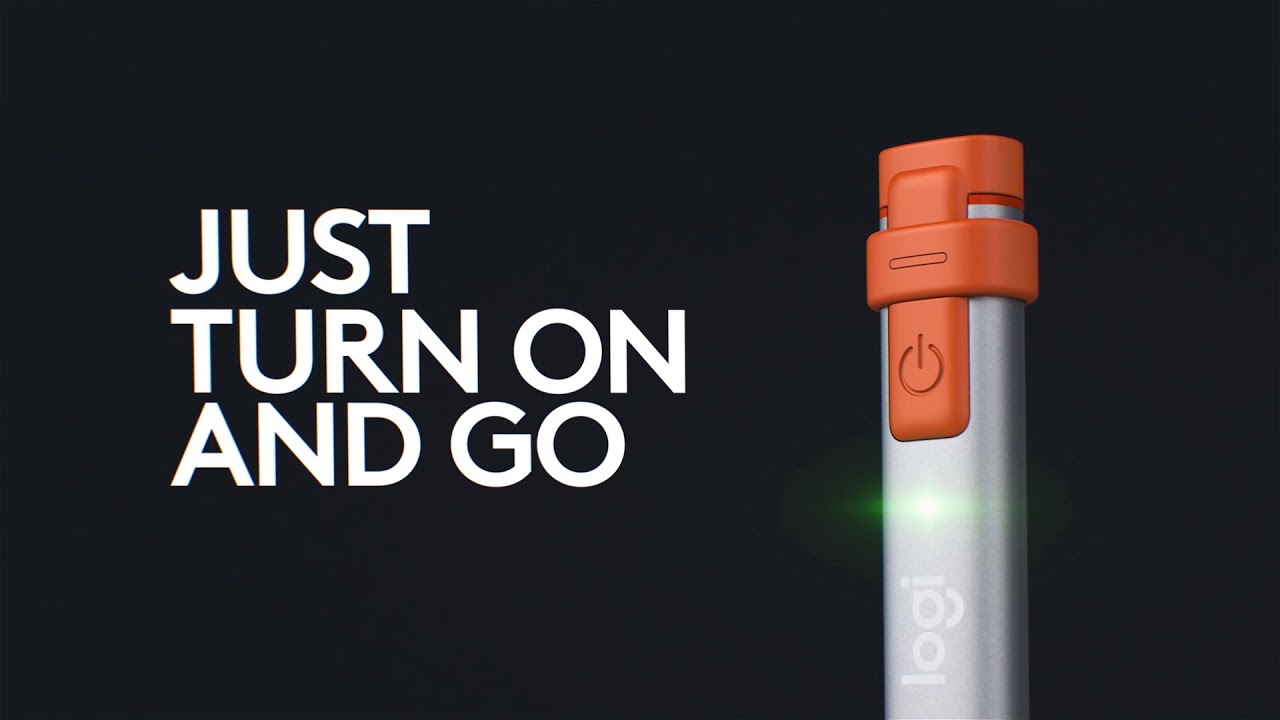
JUST TURN ON AND WRITE
Simply press the on button and start writing or drawing on iPad right away — it’s that easy. Logitech Crayon connects to iPad instantly with no complex device pairing or other delays.
BATTERY LIFE THAT LASTS
Logitech Crayon gives up to 7.5 hours of writing time on a single charge and shuts off automatically after 30 minutes idle time to save battery. If you’re low, no worries—a 2 min charging boost through your Lightning Cable provides 30 min of writing time.
PALM REJECTION TECHNOLOGY
Go right ahead and rest your palm on the screen while you write — iPad supports palm rejection for natural hand placement while using Logitech Crayon. Now you can stop worrying about your hands and focus on the task at hand instead.
SHAPED TO STAY PUT
The unique design of Logitech Crayon isn’t just for show—it’s also built for durability. The flat shape stays exactly where you leave it and prevents it from rolling off desks or getting lost underneath shelves.

WORKS WITH HUNDREDS OF APPS
Use Crayon so that you can learn a new language, sketch, design, or create with apps that are compatible with Apple Pencil.
SETUP RESOURCES
GET TO KNOW YOUR CRAYON
| Dimensions | Height: | 6.42 in (163 mm) |
| Width: | 0.47 in (12 mm) | |
| Depth: | 0.31 in (8 mm) | |
| Weight: | 0.71 oz (20 g) | |
| Technical Specifications | Protection | 4 ft (1.2 m) drop |
| Power and Connectivity | Lithium battery | |
| Up to 7.5 hours of active writing time | ||
| Automatically powers off after 30 minutes of idle time to preserve battery | ||
| On/off button requiring 1 sec press | ||
| Battery life indicator | Short press on on/off button | |
| Green light if battery > 10% | ||
| Red light if battery < 10% | ||
| LED blinks red if battery life < 5% | ||
| Charge via iPad lightning cable | ||
| Charging port covered by a replaceable tethered cap | ||
| Tip | Replaceable (purchased separately) | |
| Tilt sensitivity for dynamic line weight | ||
| Palm rejection technology ignores stray touches | ||
| Materials | Tube: | Aluminum |
| Cap: | Silicon Rubber | |
| Tip cover: | PC+ABS | |
| COMPATIBLE DEVICES | iPad Pro 12.9-inch | |
| iPad Pro 12.9-inch (5th gen) | Model: A2378, A2461, A2379, A2462 | |
| iPad Pro 12.9-inch (4th gen) | Model: A2229, A2069, A2232, A2233 | |
| iPad Pro 12.9-inch (3rd gen) | Model: A1876, A2014, A1895, A1983 | |
| iPad Pro 11-inch | ||
| iPad Pro 11-inch (3rd gen) | Model: A2377, A2459, A2301, A2460 | |
| iPad Pro 11-inch (2nd gen) | Model: A2228, A2068, A2230, A2231 | |
| iPad Pro 11-inch (1st gen) | Model: A1980, A2013, A1934, A1979 | |
| iPad | ||
| iPad (9th gen) | Model: A2602, A2603, A2604, A2605 | |
| iPad (8th gen) | Model: A2270, A2428, A2429, A2430 | |
| iPad (7th gen) | Model: A2197, A2200, A2198 | |
| iPad (6th gen) | Model: A1893, A1954 | |
| iPad Air | ||
| iPad Air (5th gen) | Model: A2588, A2589, A2591 | |
| iPad Air (4th gen) | Model: A2316, A2324, A2325, A2072 | |
| iPad Air (3rd Gen) | Model: A2152, A2123, A2153, A2154 | |
| iPad mini® | ||
| iPad mini (6th gen) | Model: A2567, A2568, A2569 | |
| iPad mini (5th gen) | Model: A2133, A2124, A2126, A2125 | |
| *All iPad models must be updated to iOS 12.2 and above | ||
| In the Box | Logitech Crayon | |
| Documentation | ||
Based on 0 reviews
Only logged in customers who have purchased this product may leave a review.
Compatible products
-
Covers and Cases
Xundd Multi-angle Magnetic Folio Case iPad Air 10.9/11 (2020-2026)
incase of installments will the official price
- Constructed with high-quality PC+PU material
- this case offers reliable protection for your tablet
- safeguarding it against everyday scratches and bumps
- With the function of auto sleep/wake, the strong magnetic attraction
- the case remains securely attached, preventing accidental falls while offering easy installation and removal
- Maintains the sleek profile of your tablet, restoring the feel of bare metal while providing full coverage and protection
SKU: 76933925115609 -
Covers and Cases
Nillkin Bumper Leather Case Pro iPad Pro 12.9 (2020-2022)/Air 13 (2024-2026)
-30%Quick View Covers and Cases
Nillkin Bumper Leather Case Pro iPad Pro 12.9 (2020-2022)/Air 13 (2024-2026)
incase of installments will the official price
- Keep all features easily accessible
- Bumpers on 4 corners for all-around protection
- Smart magnetic control for wake-up/sleep function
- mold by integral injection with geometric design
- A stable stand allows flexible-angle viewing
- High-quality imported TPU, PC, and PU leather materials
- Equipped with bumpers on each corner to protect the tablet from scratch and shock.
SKU: n/a -
Covers and Cases, KeyBoards
Nillkin Bumper Combo Keyboard Case iPad Pro 13 (M4/M5) (2024/2025) (Backlit Version)
-30%Quick View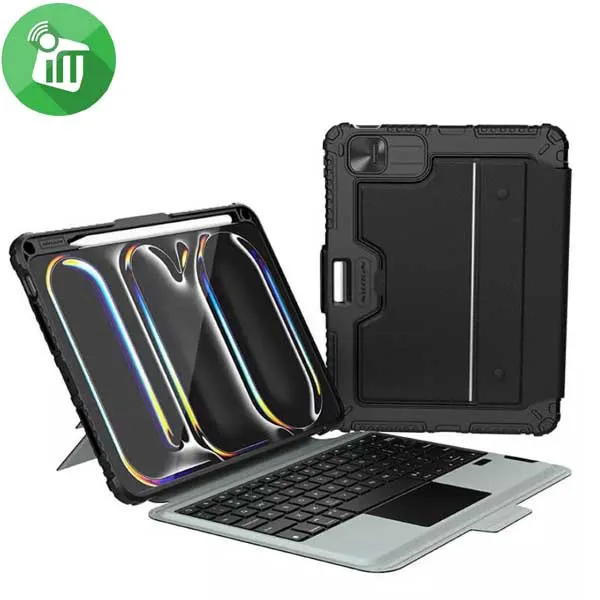 Covers and Cases, KeyBoards
Nillkin Bumper Combo Keyboard Case iPad Pro 13 (M4/M5) (2024/2025) (Backlit Version)
incase of installments will the official price
- Reliable protection
- Convenient for your work and entertainment
- Built-in magnet connection supports Tablets’ auto-wake/sleep feature
- Made with imported TPU, PC, and PU material, Bumper gives your Tablet triple protection
- Mold by integral injection with geometric design subtly combines with protection and fashion.
- The flip cover is made of selected PU leather with no texture, which is durable and anti-slip.
SKU: 6902048298637 -
Screen Protectors
Xundd AXE Series Paper-like Film Screen iPad 10.9 10th (2022)/iPad A16 (2025)
-30%Quick View Screen Protectors
Xundd AXE Series Paper-like Film Screen iPad 10.9 10th (2022)/iPad A16 (2025)
incase of installments will the official price
- provide edge-to-edge protection for your device’s screen
- Matte paper-like surface, that allows for a smooth writing experience
- Optimal protection for your screen while enabling maximum clarity
- Allows for a smooth writing experience as well as optimal clarity and anti-glare functions
- Anti-glare feature which enhances your comfort while reading on the screen of your device.
- provides full-screen protection for your device and optimizes your drawing and writing experience.
SKU: 26933925102291 -
Screen Protectors
Xundd AXE Series Paper-like Film Screen iPad Air 11 (2024-2026)
incase of installments will the official price
- provide edge-to-edge protection for your device’s screen
- Matte paper-like surface, that allows for a smooth writing experience
- Optimal protection for your screen while enabling maximum clarity
- Allows for a smooth writing experience as well as optimal clarity and anti-glare functions
- Anti-glare feature which enhances your comfort while reading on the screen of your device.
- provides full-screen protection for your device and optimizes your drawing and writing experience.
SKU: 76933925111311 -
Screen Protectors
Xundd AXE Series Paper-like Film Screen iPad Air (2020-2022)/iPad Pro 11 (2018-2022)
-30%Quick View Screen Protectors
Xundd AXE Series Paper-like Film Screen iPad Air (2020-2022)/iPad Pro 11 (2018-2022)
incase of installments will the official price
- provide edge-to-edge protection for your device’s screen
- Matte paper-like surface, that allows for a smooth writing experience
- Optimal protection for your screen while enabling maximum clarity
- Allows for a smooth writing experience as well as optimal clarity and anti-glare functions
- Anti-glare feature which enhances your comfort while reading on the screen of your device.
- provides full-screen protection for your device and optimizes your drawing and writing experience.
SKU: 26933925110425 -
Screen Protectors
Xundd AXE Series Paper-like Film Screen iPad Pro 13 (2024)/Air 13 (2024)
-29%Quick View Screen Protectors
Xundd AXE Series Paper-like Film Screen iPad Pro 13 (2024)/Air 13 (2024)
incase of installments will the official price
- provide edge-to-edge protection for your device’s screen
- Matte paper-like surface, that allows for a smooth writing experience
- Optimal protection for your screen while enabling maximum clarity
- Allows for a smooth writing experience as well as optimal clarity and anti-glare functions
- Anti-glare feature which enhances your comfort while reading on the screen of your device.
- provides full-screen protection for your device and optimizes your drawing and writing experience.
SKU: 76933925111342

Popular essentials for your phone
-
Mounts & Holders
iPega PG-9111 Silent RGB Wireless Gaming Controller
- Quiet Buttons: Ultra-silent clicks so you can play without disturbing anyone around you.
- RGB Lighting: Colorful light rings around the joysticks.
- Wide Compatibility: Works with Android, iOS (MFi), PC, Nintendo Switch, PS3, PS4, and Smart TVs.
- Plug & Play: Direct connection with no complex setup or extra apps needed.
- Advanced Gaming Functions: Includes Macro button programming, Turbo rapid fire, and dual-motor vibration.
SKU: 6974363711603 -
-
-

There are no reviews yet.