

Microsoft Natural Ergonomic 4000 Wired Keyboard

Out of stock
incase of installments will the official price
- Get better support with this plush, integrated palm rest
- Get a closer look quickly and accurately with the intuitive Zoom Slider
- Touch a button to quickly access your email application and the Internet
- Quickly and easily access and control all of your media from your keyboard
- Quickly reach for commonly used symbols, such as equal sign, parentheses, and “Backspace
- Type in total comfort ergonomic design encourages natural wrist and arm alignment so you can work without discomfort
3,599 EGP 4,199 EGP
Out of stock
Microsoft Natural Ergonomic 4000 Wired Keyboard
Overview
Ergonomic design
Type in total comfort—ergonomic design encourages natural wrist and arm alignment so you can work without discomfort
 Improved number pad
Quickly reach for commonly used symbols, such as equal sign, parentheses, and “Backspace.” They are now located just above the number pad

Quickly and easily access common tasks, including product information, registration, settings, and more for popular devices such as cell phones, cameras, printers, and mouse, keyboard, and webcam products

Industry leading ergonomic keyboard design
Given the time you spend with your hands on a keyboard, investing in the newest addition to Microsoft’s best-selling line of ergonomic keyboards can pay dividends in greater comfort. According to some studies, ergonomic keyboard designs, such as the Microsoft Natural line, have been associated with significant reduction of carpal tunnel syndrome symptoms
Rest your wrists against the plush palm rest in a relaxed, natural angle with this keyboard’s curved key bed, ergonomic arc, and reversed slope. Apart from comfort and support, enjoy quick, customizable way to reach files, folders, and web pages with handy hot keys. For close-in tasks, use the Zoom Slider, located in the middle of the keyboard, to zoom in and out with the touch of a finger

Features :
- Get better support with this plush, integrated palm rest
- Get a closer look quickly and accurately with the intuitive Zoom Slider
- Touch a button to quickly access your email application and the Internet
- Quickly and easily access and control all of your media from your keyboard
- Quickly reach for commonly used symbols, such as equal sign, parentheses, and “Backspace
- Type in total comfort ergonomic design encourages natural wrist and arm alignment so you can work without discomfort
| Brands | |
|---|---|
| Color | |
| Special Filters | |
| Devices Filters |
Based on 0 reviews
Only logged in customers who have purchased this product may leave a review.
Compatible products
-
Covers and Cases, Screen Protectors, Security Tools
Webcam Cover Privacy Protection For Smartphone Tablet Laptop
-33%Quick View Covers and Cases, Screen Protectors, Security Tools
Webcam Cover Privacy Protection For Smartphone Tablet Laptop
- Suitable for laptops, tablets, and mobile phones
- Slim design, will not affect closing the computer lid
- Simple to install, just paste and press firmly for a while
- Environmental friendly and high-quality materials, durable to use
- It is perfect to provide privacy, security and peace of mind to individuals, groups, organizations, companies and governments
- Suitable for laptops, tablets, and mobile phones Slide the cover to protect your privacy when you don’t need the webcam
SKU: 60022516 -
Covers and Cases
DDC Crystal Shell Case For HUAWEI MateBook X 2020
incase of installments will the official price
- Easy to apply and remove
- Rubber feet help prevent slipping on many surfaces
- No cut out design, huawei logo shine through the case
- Plug your charger, cable or headset without removing the case
- Bottom case effectively enhance the heat dissipation
- Impact protection that protects your device from scrapes and scratches
- Full protection with perfect cuts, precise cutouts allow full access to all ports and features
SKU: n/a -
Screen Protectors
iScreen TPU LCD Monitor Screen Protector (14.6-inch)
incase of installments will the official price
- Product details of High Quality inch Laptop Screen Protector
- ULTRA TRANSPARENCY makes the screen protector almost invisible
- The oleophobic coating of matte protector reduces smudges and fingerprints greatly.
- You can clean your laptop screen with a simple wipe.
- PROTECT SCREEN FROM SCRATCHES AND DUST
- The screen guard protector is with superior performance to prevent scratches and dust when daily use.
- The Laptop keyboard protector your laptop remains protected.
SKU: 60098054 -
Screen Protectors
iScreen TPU LCD Monitor Screen Protector (15.6-inch)
incase of installments will the official price
- Product details of High Quality inch Laptop Screen Protector
- ULTRA TRANSPARENCY makes the screen protector almost invisible
- The oleophobic coating of matte protector reduces smudges and fingerprints greatly.
- You can clean your laptop screen with a simple wipe.
- PROTECT SCREEN FROM SCRATCHES AND DUST
- The screen guard protector is with superior performance to prevent scratches and dust when daily use.
- The Laptop keyboard protector your laptop remains protected.
SKU: 60098061


Popular essentials for your laptop
-
Hub
Belkin CONNECT USB-C 6-in-1 Multiport Adapter
- Connect a USB-C laptop or Macbook or iPhones or iPad to multiple devices.
- Expands USB-C port into an HDMI port, 2 USB-A 3.0 BC1.2.
- ports, Gigabit Ethernet port, SD card reader, and USB-C PD port.
- Power and charge high-power consumption devices like hard.
- drives, phones, and tablets with the USB-A 3.0 BC1.2 ports.
- AVC008BTSGY Supports pass-through charging up to 100W.
- Compact design gives easy mobility and reduces desktop clutter.
- 5 Gbps of bandwidth for quick data transfer between computer and peripherals.
- HDMI port supports up to 4K resolutions at 30Hz.
SKU: 745883819829 -
Hub
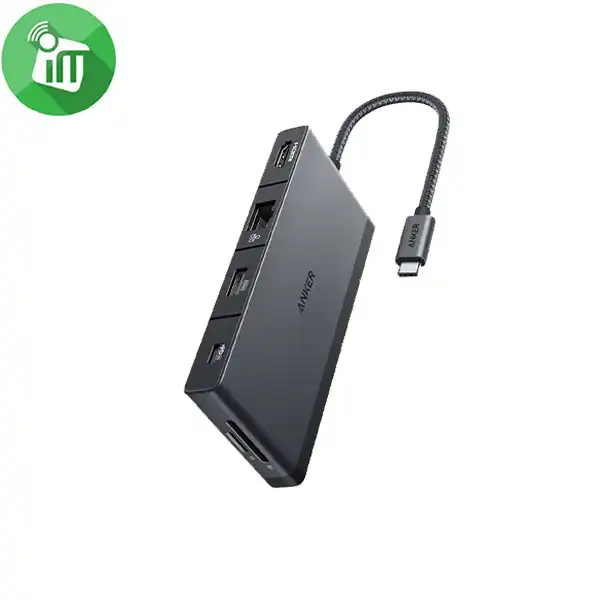
Anker A8373 552 USB-C Hub 9-in-1 4K HDMI (Series 5)
incase of installments will the official price
- Equipped with two 5 Gbps USB 3.0 data ports, two 480 Mbps USB-A ports
- 4K HDMI port, a 100W PD-IN port, an Ethernet port, and SD/microSD card slots.
- Use the HDMI port to connect to an external monitor and mirror or extend your display at up to 4K@30Hz.
- Transfer files to and from your laptop at speeds of up to 5 Gbps via the USB 3.0 USB-C
- USB-A data ports, or use the SD/microSD card slots to access photos and other media files at up to 104 MB/s.
- Supports up to 100W (minus 15W for operation) pass-through charging so you can power up your laptop while you use the hub.
SKU: 194644117474 -
Hub
Belkin USB-C 4-in-1 Multiport Adapter
incase of installments will the official price
- Turn a single USB-C port into an HDMI 1.4 port, 2 USB-A 3.0 BC1.2 ports, and a USB-C PD port.
- Connect to high-power consumption devices like hard drives, phones, and tablets with the adapter’s USB-A 3.0 BC1.2 ports.
- Access up to 4K resolutions (3840×2160 @ 30Hz) through the HDMI port.
- Supports pass-through charging up to 100W.
- Compact design gives easy mobility and reduces desktop clutter.
- Fast data transfer between computer and peripherals with up to 5 Gbps of bandwidth.
SKU: 745883819805 -
Connectors & Converters, Hub, Original Products
Apple USB-C VGA Multiport Adapter
incase of installments will the official price
- lets you connect your MacBook with USB-C port to a VGA display,
- while also connecting a standard USB device and a USB-C charging cable.
-
Requires a VGA cable (sold separately) for connection to your TV or projector.
-
The USB-C VGA Multiport Adapter lets you connect your USB-C or Thunderbolt 3 (USB-C) enabled Mac and iPad Pro to a VGA display, while also connecting a standard USB device and a USB-C charging cable.
SKU: 888462074995



There are no reviews yet.