

Google Chromecast 4K with Google TV

Out of stock
incase of installments will the official price
- Chromecast with Google TV streams your in up to 4K HDR
- Google TV organizes movies and TV shows from all of your favorite services into a single screen
- Get personal recommendations based on content you enjoy
- Ask for a specific title or search by mood, genre, actor, and more
- Cast from thousands of compatible Android and iOS apps directly from your device
- mirror your Chrome browser tab to your TV
- Watch your favorites with your voice
- Chromecast works with almost any TV with an HDMI port.
- Just plug it in, connect to Wi-Fi, and start streaming
5,199 EGP 5,930 EGP
Google Chromecast 4K with Google TV
Overview
Entertainment you love.
With a little help from Google
Meet Chromecast with Google TV
No switching apps.
Just watching.
Google TV organizes all your content – across all your streaming services – on one screen. So it’s easy to find what to watch

An app-load of your favorites
Discover over 700,000 movies and TV episodes, plus millions of songs. The entertainment you love.
All in one place
Get personal recommendations
Find your next favorite based on your subscriptions, viewing history, and content you own
From the small screen to the TV
Cast from thousands of compatible Android and iOS apps directly from your phone, laptop, or tablet. And mirror your Chrome browser tab to your TV
Kick back and watch live TV
With YouTube TV, you can easily browse live sports, news, shows, movies, and more from 85+ top channels. See your live guide and what’s playing on the home screen
Watch your favorites
with your voice
Press the Google Assistant button on the included remote to ask Google to find movies, shows, or music

Relive your memories
Enjoy a slideshow of your pictures from your google photos library right on your TV
Search for anything
Search movies and shows, get answers, and more with your voice remote. just ask google “find action movies”
Plug in. Stream on.
Chromecast works with almost any TV with an HDMI port. Just plug it in, connect to Wi-Fi, and start streaming

Pump up the sound
Group Chromecast with your Nest speakers or displays to fill your home with sound. Then control them by using your voice or the app
Breathe life into your TV
Upgrade your TV and help keep waste out of landfills
Inside Chromecast
with Google TV
Features:
- Chromecast with Google TV streams your entertainment in up to 4K HDR
- Google TV organizes movies and TV shows from all of your favorite services into a single screen
- Get personal recommendations based on content you enjoy
- Ask for a specific title or search by mood, genre, actor, and more
- Cast from thousands of compatible Android and iOS apps directly from your phone, laptop, or tablet. And mirror your Chrome browser tab to your TV
- With YouTube TV, you can easily browse live5 sports, news, shows, movies, and more from 85+ top channels. See your live guide and what’s playing on the home screen
- Watch your favorites with your voice
- Chromecast works with almost any TV with an HDMI port. Just plug it in, connect to Wi-Fi, and start streaming
What’s in the box:
- Chromecast
- Power cable
- Power adapter
- Voice remote
- 2 AAA batteries
Requirements:
- TV with an HDMI port
- Wi-Fi network Supported
- Wi-Fi–enabled device
| Brands | |
|---|---|
| Color | |
| Special Filters | Smart Home, Android Devices, ios Devices, Wireless Connection |
| Chromecast with Google TV | |
| Dimensions & Weight | Length: 6.4 in (162 mm) Width: 2.4 in (61 mm) Height: 0.5 in (12.5 mm) |
| Resolution | Up to 4K HDR, 60 FPS Supports resolutions up to 4K and high dynamic range (HDR) |
| Video Formats | Dolby Vision, HDR10, HDR10+ for stunning picture quality |
| Ports | HDMI to plug directly into the TV USB Type-C power |
| Connectivity | Wi-Fi 802.11ac (2.4 GHz / 5 GHz) Bluetooth® |
| Operating System | Android TV OS |
| Voice Remote | |
| Dimensions | Length: 4.8 in (122 mm) Width: 1.5 in (38 mm) Height: 0.7 in (18 mm) |
| Weight | 2.2 oz (63 g) |
| Sensors | Accelerometer |
| Connectivity | Bluetooth® IR to control TV, soundbar, or receiver |
| Mic | Integrated microphone for Google Assistant |
| Power | 2 AAA batteries included |
| Compatibility | Requires Chromecast (Google TV) |
Based on 0 reviews
Only logged in customers who have purchased this product may leave a review.
Accessories for this product
-
Charging Tools, Top Seller
Google 45W USB-C Power Charger
incase of installments will the official price
- Input: 00–240 V, 50/60 Hz
- Output PD: 5 V/3 A, 9 V/3 A, 15 V/3 A, 20 V/2.25 A
- Output PPS: up to 11 V/3 A, 16 V/3 A, 21 V/2.25 A max. 45W
- Compact size with foldable
- Up to 45W of fast charging for one device
- Power up your Pixel 9 Pro XL to 70% battery in about 30 minutes
- Made for your Google devices. Pixel phones, Pixel Buds and even your laptop
- The 45W USB-C Power Charger delivers fast and efficient charging for all your Pixel devices
SKU: 840353913769 -
Charging Tools
DOBE Dual Controller Charging Dock for PS5/X-Series S / X / N-S / Google (TYX-0613)
-23%Quick View Charging Tools
DOBE Dual Controller Charging Dock for PS5/X-Series S / X / N-S / Google (TYX-0613)
incase of installments will the official price
- Compatibility For PS5 Controller, Pro controller, Google cloud controller, Xbox Series S/X, Xbox Elite 2 Controller
- LED Charging Indicator It is easy to see the charging status of the dual controller by the different colors
- High-Speed Charging 4h fully charged one controller, about 4.5 for fully charged two controllers simultaneously
- Safe Protection Includes short-circuit protection, over-temperature protection, and over-voltage protection.
- Smart Chip Design It is of unique decorations, beautiful appearance, and simple to use.
- Save Space Say goodbye to the charging cable, and controller holder stand and keep the game space clean and tidy.
- Aesthetic Match Portable stand makes this charger a more beautiful, lightweight, airplane-style design
SKU: 6972520252808 -
Cables, Top Seller
Google USB-C to USB-C Cable 2M (Unpacked)
incase of installments will the official price
- Google USB Type C Cable quick and powerful fast charging
- With this handy cable, your USB-C devices can be used with the latest USB-C laptops, phones, and more for charging and data transfer
- Original Google USB Type-C Cable compatible with other devices such as Samsung Galaxy
- Enhanced and Durable Google Cable works with Laptop, Tablet, PS5s, Smartphones
- Connect your USB-C-enabled gear to transfer data and charge devices
- 2-Meter / 6-Foot Cable Length
- USB-C Reversible Connector
- Quick and powerful
- Smooth, bright surface with the suitable length
- Charge your device with a lengthy 2 meter cable
- Connect your USB-C enabled gear to transfer data and charge devices.
- Long, detachable USB-C cable No more sitting down right next to the power outlet
- Plug in the 18W Power Adapter designed with USB Power Delivery to charge your USB-CTM enabled devices quickly
SKU: 60083777


Popular essentials for your device
-
Mounts & Holders
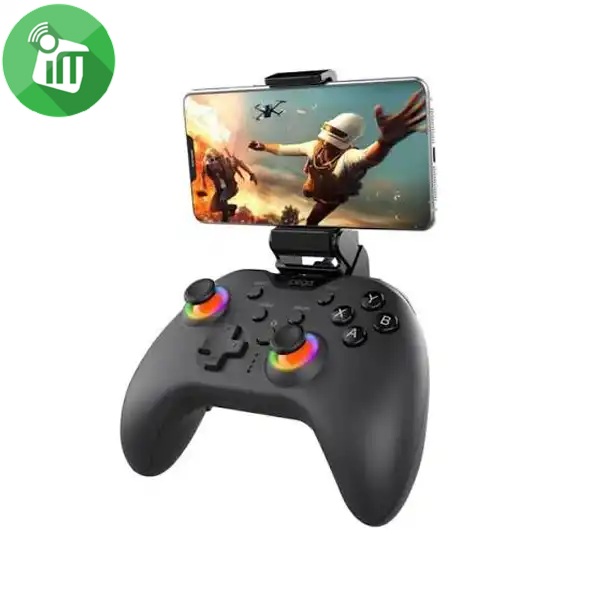
iPega PG-9111 Silent RGB Wireless Gaming Controller
- Quiet Buttons: Ultra-silent clicks so you can play without disturbing anyone around you.
- RGB Lighting: Colorful light rings around the joysticks.
- Wide Compatibility: Works with Android, iOS (MFi), PC, Nintendo Switch, PS3, PS4, and Smart TVs.
- Plug & Play: Direct connection with no complex setup or extra apps needed.
- Advanced Gaming Functions: Includes Macro button programming, Turbo rapid fire, and dual-motor vibration.
SKU: 6974363711603 -
-
-
There are no reviews yet.